A cluttered entertainment center is more than just an eyesore; it is a source of frustration and a potential safety hazard. Behind your television, soundbar, and gaming consoles lies a tangled web of power cords and data lines that can turn a simple equipment upgrade into a messy chore. Managing these wires improves airflow around your electronics, reduces the risk of tripped breakers, and protects delicate ports from the strain of heavy, dangling cables.
Assessing Your Setup
Before buying organizers, take stock of what you are actually working with. Power down your devices and pull your media console away from the wall. Trace every cable from its source to its destination. This inventory helps you spot “ghost” cables-cords connected to equipment you no longer use-that can be removed entirely.
Categorizing Your Cables
Sorting wires by function makes the physical organization process much more manageable and helps keep power lines separate from signal lines, which minimizes electromagnetic interference.
- Power Cables: Thick, insulated cords that connect to wall outlets or surge protectors.
- Signal Cables: HDMI, optical audio, coaxial, and Ethernet lines that carry data.
- Peripheral Cables: Thinner lines for USB accessories, controllers, or external hard drives.
The Fundamentals of Cable Management
The best cable management strategies are flexible. You don’t need expensive, permanent solutions; often, simple tools that allow for future adjustments work best.
Velcro vs. Zip Ties
Avoid permanent zip ties. They are difficult to remove without nicking the cable insulation. Velcro straps are the superior choice because they are adjustable, reusable, and gentle on wires. Use them to bundle cords traveling in the same direction, but avoid pulling them so tightly that they compress the internal wiring.
Managing Excess Length
Excess cable length is the primary culprit behind a “rat’s nest.” If you have a twelve-foot HDMI cable connecting a device three feet away, the extra bulk creates clutter. Replace overlong cables with shorter, custom-length versions whenever possible. If you must keep the extra length, coil it in a loose figure-eight pattern rather than a tight circle to prevent heat buildup and signal stress.
Strategic Concealment
Once your cables are bundled, the next step is hiding them. The method you choose depends on your specific setup.
Cable Management Boxes
For setups with multiple power adapters, a cable management box is an excellent investment. These units house your surge protector inside a clean shell, feeding cables through side slots. This keeps power bricks off the floor and prevents pets or children from tugging on exposed wires.
Clips and Raceways
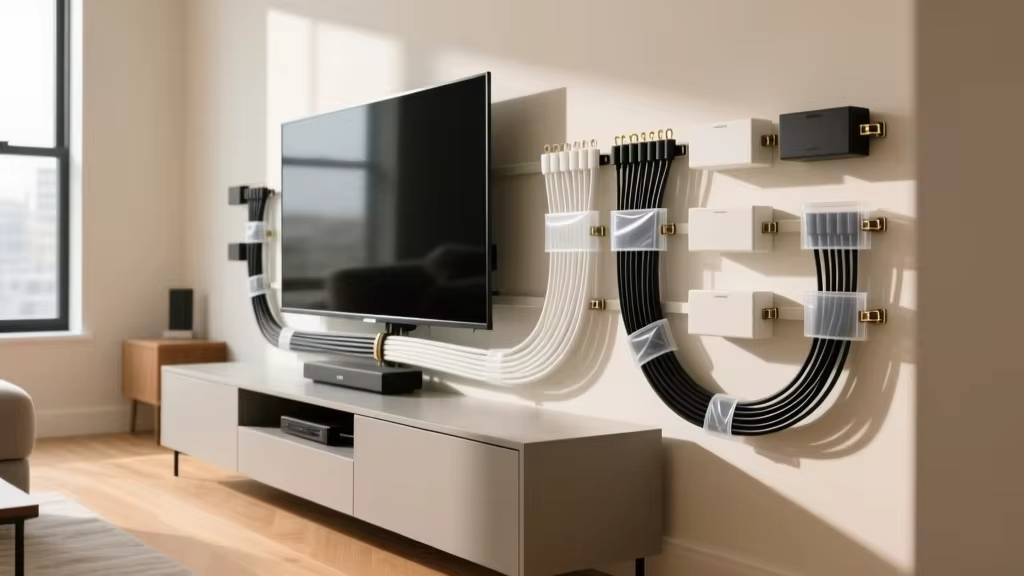
Adhesive clips are the unsung heroes of organization. Stick them to the back of your TV stand or along the wall to route individual wires exactly where you want them. For wall-mounted TVs, plastic raceways are the standard solution. These channels stick directly to the wall and can be painted to match your decor, turning a messy vertical drop of wires into a single, clean line.
Prioritizing Safety and Airflow
Aesthetics should never come at the expense of your hardware. Modern consoles and amplifiers generate significant heat; if you block ventilation ports with a mess of wires, you are shortening the lifespan of your electronics.
Ventilation and Interference
Never wrap cables around cooling fans or air vents. If you use a cable sleeve or a closed-back cabinet, ensure there is enough room for air to circulate. If the back of your cabinet is sealed, consider installing a small USB-powered fan to keep the temperature stable. Additionally, try to keep power cords and signal cables separated. If they must cross, do so at a 90-degree angle to reduce electromagnetic noise.
Advanced Solutions for a Permanent Look
If you want the cleanest possible finish, consider these more involved methods.
In-Wall Routing
For those comfortable with basic tools, in-wall cable management kits offer an “invisible” look. These kits include recessed plates-one behind the TV and one near the floor-allowing you to pass cables through the wall cavity. Always verify local electrical codes before running power cables inside a wall.
Integrated Furniture
When shopping for a media console, look for models with built-in cable management. High-quality furniture often features pre-drilled holes, vertical channels in the legs, or removable back panels designed to hide wires from the start.
Maintenance and Long-Term Care
Organization is not a one-time project. As you upgrade hardware, your system will need to evolve. The key to staying tidy is labeling every cable at both ends. Use a label maker or masking tape to identify each cord; this prevents the “guesswork” that leads to pulling the wrong plug and undoing your hard work.
Regular Inspections
Every few months, check your setup. Ensure no adhesive clips are losing their grip, verify that no cables are pulling tightly against their ports, and dust your cable bundles. A quick, proactive adjustment is much easier than a complete overhaul once the system becomes cluttered again.